
include ("session-utils.php");
include ("common-header.php");
$teacherOrKid = $_SESSION['teaOrKid'];
?>
ShowCommonHeader();
?>
include ("MathApp_utils.php");
include ("misc-jsutils.php");
inclEndSessScript($BrwCh, $BrwN6, $BrwIE, $BrwFF, $AcctID);
include ("google-ads.php");
ShowGoogleAd($A_HOW_WORK);
include ("menu_utils.php");
include ("lang-bottom-links.php");
?>
|
ShowMenuBar('guide');
?>
|
|
The teacher doesn't have to write (or type) a Math homework, make copies, distribute it to
students, collect them back, grade them and finally tabulate scores. Students don't have to
worry about forgetting homework at home or about their dog eating it. This is year 2000 and
internet can help you out. The homework feature in MathDrill works in 4 steps. Steps
1 and
4 require a teacher to login
as a teacher from his or her browser while steps
2 and
3 require a student to login as a kid
from his or her browser. Click on the links of the table below to see annotated screen shots of
each step.
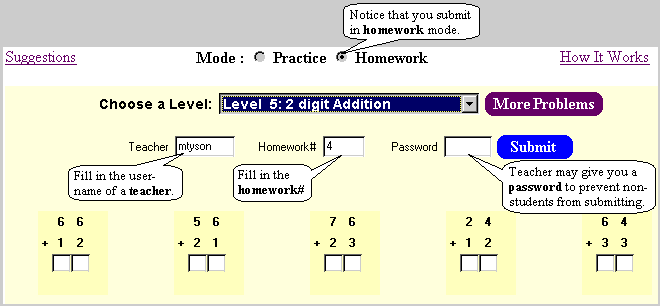
Screen Shot for Step#3 : Submit a homework
(You must do Step#2 first by going to the
print(" Check for Homework \n");
?>
page. Click at the desired homework# in the table there. That will
bring up the Problems page configured to show the required number of
problems instead of the usual 10. It will also set the mode and
fill the Teacher and
Homework# fields automatically.)
|
|
include ("bottom-links.php");
ShowBottomLinks($teacherOrKid, $sidSfx, $MainApp, $Logout, $BRW, $lang);
?>